Text Compare is generally means comparing Text or Simple Values between 2 files or resources and identifying the Similarities and Differences between
Lets Find out how can we achieve this using various ways of different Comparison tools
- Data Decoder
Data Decoder Text Compare Script will compare the text in 2 files and finds the similarities and differences. The data can be any text form like names, numbers, email ids, countries, phone numbers etc
How to get this Script
Download Text Compare Zip File
Note: Customization can be done on Request
How to Use it
1) Download the zip file
2) Unzip the Files
3) Fill the values which are to be compared in File1 and File2 which acts as Input Files
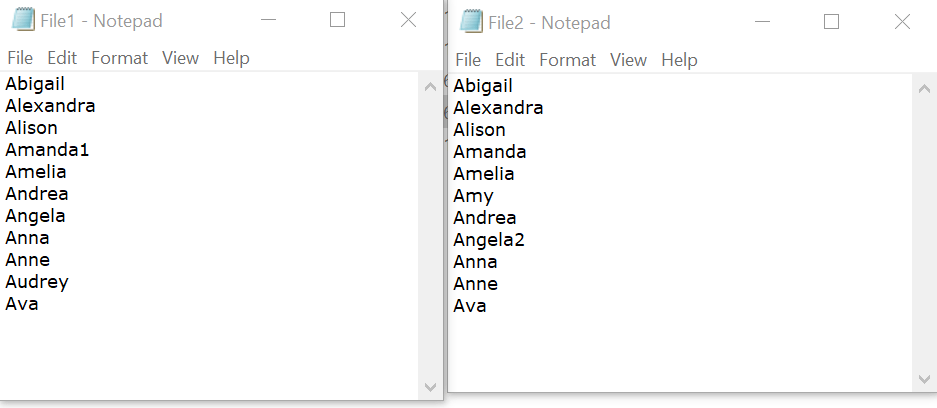
4) Run the Script GET_MATCHING_RECORDS_OF_FILE1.vbs
5) Once script execution is completed. Open the Matches and NoMatches files
6) Matches File will have the common values between two input files
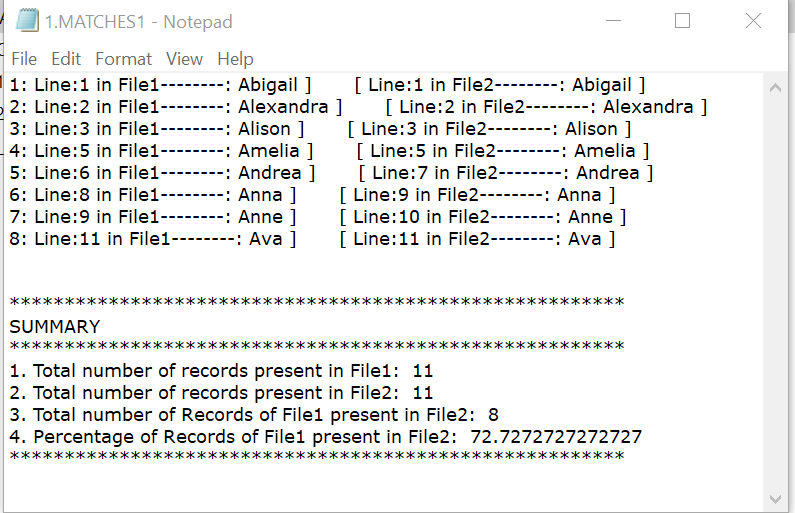
7) NoMatches file will have the “Records present in File1 not present in File2”
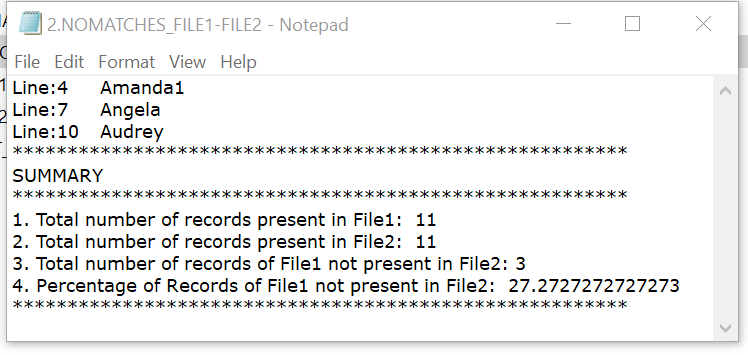
Note: To find out the “Records present in File2 not present in File1”. Run the other script “GET_MATCHING_RECORDS_OF_FILE2.vbs” which works the otherway round
Pros
This DataDecoder Text Compare can show the detailed results and also there will be summary results
Summary Results will also contain the percentage wise breakup
Detailed Results will have the Line Numbers from both the files displayed for any specific value. By this it will be east to map and locate the values
Cons
This runs only on Windows machines
This need to be downloaded
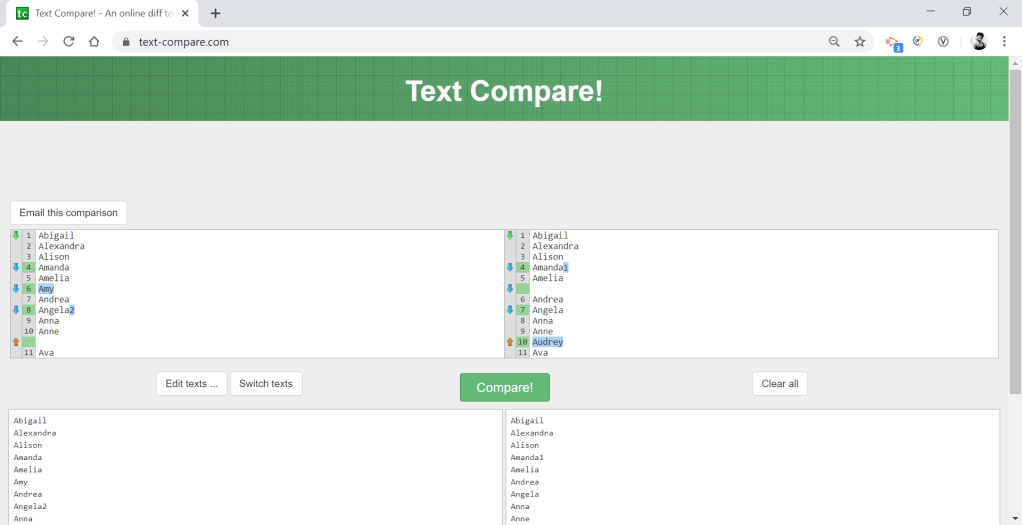
2. Text Compare Utility (Online)
Visit the site https://text-compare.com/
Place the Data to be compared in both left and right boxes and Click Compare
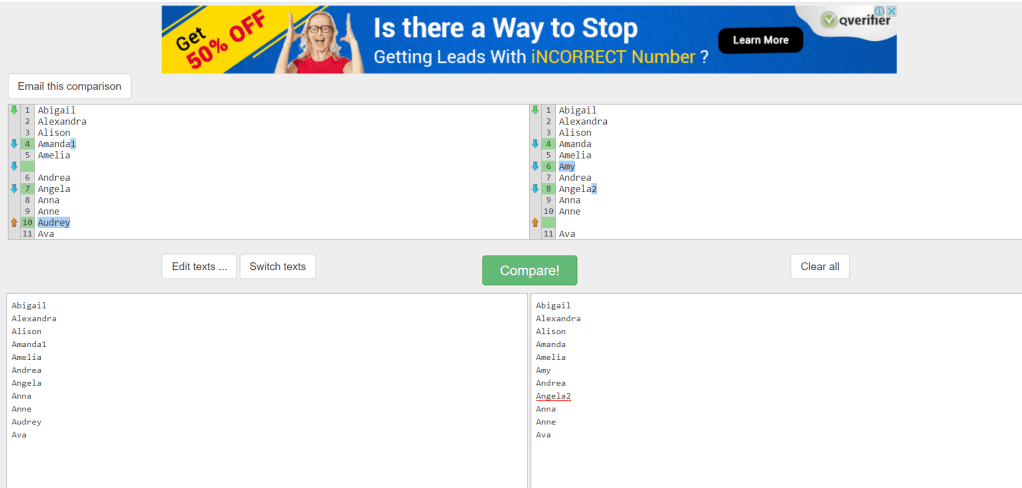
Now Flip the Data to see the Comparison from other way round
3. Diffchecker
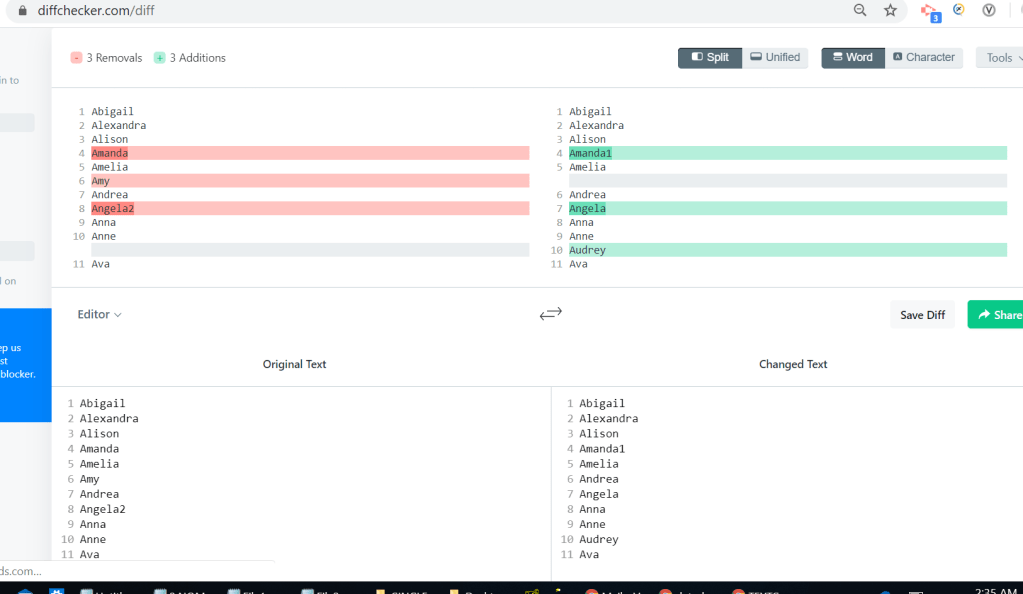
Visit the site htthttps://www.diffchecker.com/diff
Place the Data to be compared in both left and right boxes and Click Compare
4.DiffNow
Visit the Site https://www.diffnow.com/report
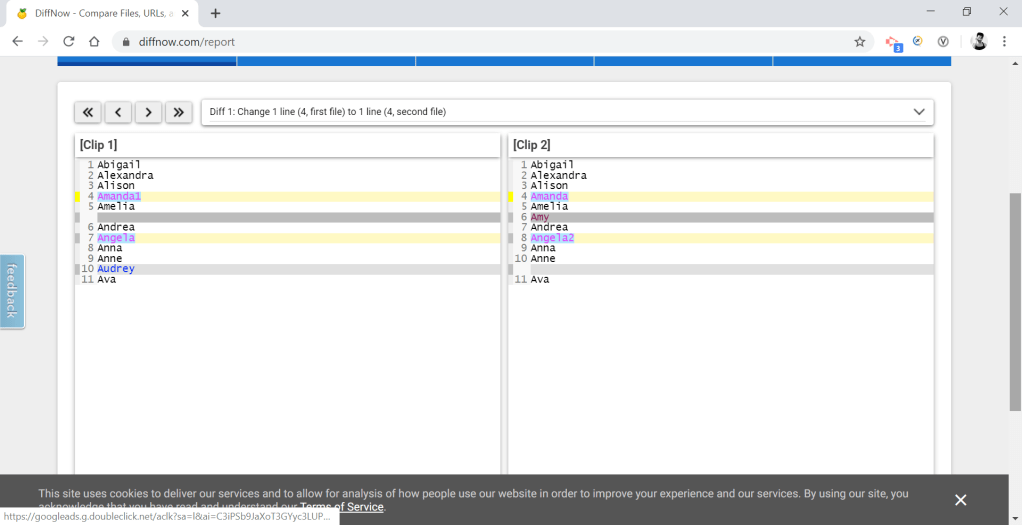
In My View. This site marks the changes in all sort of colors. I find it hard reading the changes
Expertizes
What You Do
Add more information about what you do. Lorem ipsum dolor sit amet, consectetur adipiscing elit. Proin id arcu aliquet, elementum nisi quis, condimentum nibh.
What You Do
Add more information about what you do. Lorem ipsum dolor sit amet, consectetur adipiscing elit. Proin id arcu aliquet, elementum nisi quis, condimentum nibh.
What You Do
Add more information about what you do. Lorem ipsum dolor sit amet, consectetur adipiscing elit. Proin id arcu aliquet, elementum nisi quis, condimentum nibh.
What You Do
Add more information about what you do. Lorem ipsum dolor sit amet, consectetur adipiscing elit. Proin id arcu aliquet, elementum nisi quis, condimentum nibh.
Experiences
Job Title at Company
2005 – 2008
Add more information about what you did. Lorem ipsum dolor sit amet, consectetur adipiscing elit. Proin id arcu aliquet, elementum nisi quis, condimentum nibh.
Job Title at Company
2012 – 2015
Add more information about what you did. Lorem ipsum dolor sit amet, consectetur adipiscing elit. Proin id arcu aliquet, elementum nisi quis, condimentum nibh.
Job Title at Company
2008 – 2012
Add more information about what you did. Lorem ipsum dolor sit amet, consectetur adipiscing elit. Proin id arcu aliquet, elementum nisi quis, condimentum nibh.
Job Title at Company
2015 – Present
Add more information about what you did. Lorem ipsum dolor sit amet, consectetur adipiscing elit. Proin id arcu aliquet, elementum nisi quis, condimentum nibh.
Let’s make something together.
Text Compare is generally means comparing Text or Simple Values between 2 files or resources and identifying the Similarities and Differences between
Lets Find out how can we achieve this using various ways of different Comparison tools
- Data Decoder
Data Decoder Text Compare utility has the ability to process the 2 files to be compared and can find out the similarities and differences
How to get this Script
Please send Email with Subject “Single Column Compare” to vijkid143@gmail.com for Zip File
Note: Customization can be done on Request
Description
This Script will compare the data between two files having Single Column with multiple records
How to Use it
1) Download the zip file (Please send Email with Subject “Single Column Compare” to vijkid143@gmail.com for Zip File)
2) Unzip the Files
3) Fill the values which are to be compared in File1 and File2 which acts as Input Files
4) Run the Script GET_MATCHING_RECORDS_OF_FILE1.vbs
5) Once script execution is completed. Open the Matches and NoMatches files
6) Matches File will have the common values between two input files
7) NoMatches file will have the “Records present in File1 not present in File2”
Note: To find out the “Records present in File2 not present in File1”. Run the other script “GET_MATCHING_RECORDS_OF_FILE2.vbs” which works the otherway round
Expertizes
What You Do
Add more information about what you do. Lorem ipsum dolor sit amet, consectetur adipiscing elit. Proin id arcu aliquet, elementum nisi quis, condimentum nibh.
What You Do
Add more information about what you do. Lorem ipsum dolor sit amet, consectetur adipiscing elit. Proin id arcu aliquet, elementum nisi quis, condimentum nibh.
What You Do
Add more information about what you do. Lorem ipsum dolor sit amet, consectetur adipiscing elit. Proin id arcu aliquet, elementum nisi quis, condimentum nibh.
What You Do
Add more information about what you do. Lorem ipsum dolor sit amet, consectetur adipiscing elit. Proin id arcu aliquet, elementum nisi quis, condimentum nibh.
Experiences
Job Title at Company
2005 – 2008
Add more information about what you did. Lorem ipsum dolor sit amet, consectetur adipiscing elit. Proin id arcu aliquet, elementum nisi quis, condimentum nibh.
Job Title at Company
2012 – 2015
Add more information about what you did. Lorem ipsum dolor sit amet, consectetur adipiscing elit. Proin id arcu aliquet, elementum nisi quis, condimentum nibh.
Job Title at Company
2008 – 2012
Add more information about what you did. Lorem ipsum dolor sit amet, consectetur adipiscing elit. Proin id arcu aliquet, elementum nisi quis, condimentum nibh.
Job Title at Company
2015 – Present
Add more information about what you did. Lorem ipsum dolor sit amet, consectetur adipiscing elit. Proin id arcu aliquet, elementum nisi quis, condimentum nibh.
Let’s make something together.
 datadecoder